Telegram alerts
Private push alerts for price spikes and new arbitrage entries, delivered by a Telegram bot you own and tuned entirely to your thresholds.
Web3Map Telegram alerts push two kinds of signals straight to your phone: price spikes (abnormal moves on a venue across one or more time windows) and new entries (fresh arbitrage gaps that just appeared above your minimum spread). Both arrive in a private one-to-one Telegram chat between you and a bot that belongs to you. Web3Map never shares a single bot across users: you create the bot with BotFather, you hold the bot, and Web3Map only stores its token in encrypted form so the alert pipeline can post messages into your chat.
Requirements: an active Pro (or higher) plan and a Telegram account. The whole feature is gated on premium entitlement. On My Page, Free accounts do not see the Premium alerts card at all; accounts whose Pro time has lapsed see Upgrade to Pro to enable private Telegram alerts. instead of the setup card, and the server rejects registration and linking with Premium entitlement required.
How it fits together in one paragraph: you create a dedicated bot with @BotFather and paste its HTTP API token into the Premium alerts card on My Page. Web3Map validates the token, configures the bot's webhook and its slash-command menu, and hands you a one-time deep link. You open the deep link and send /start in the private chat, which binds that chat to your Web3Map account. From then on, alerts are pushed into that chat, and the very same chat doubles as a settings console: inline menus and slash commands let you toggle signals, edit thresholds, and manage mute lists without ever opening the website.
| Alert family | What triggers it | Your main controls |
|---|---|---|
| Price spikes | A venue's buy or sell price moves by at least your threshold inside a polling window (30s, 1m, 5m, 15m, 30m, or 1h). Sell Rise and Buy Drop directions are toggled separately. | Master toggle, direction toggles, per-window on/off and per-window threshold (minimum 10%), plus dedicated mute lists for tokens, CEXes, and chains. |
| New entries | A new arbitrage pair enters the live opportunity book with a spread above your minimum (minimum 1%, default 1%). | On/off toggle, minimum spread, plus dedicated mute lists for tokens, CEXes, and chains. |
Note: Web3Map sends one Telegram message per asset per alert cycle. Every message opens with a bold family title (Price spikes or New entries) and ends with a Time: YYYY-MM-DD HH:MM:SS UTC line. Messages whose visible text would exceed 4096 characters are split into two messages with HTML formatting kept intact.
Setup walkthrough
Everything happens in the Premium alerts card on My Page (sidebar item Premium Alerts). The card kicker reads Telegram and the subtitle reads Receive premium price spikes and new entries in your private Telegram chat. The card is organized as three numbered panels that mirror the steps below.
- Connect your bot.
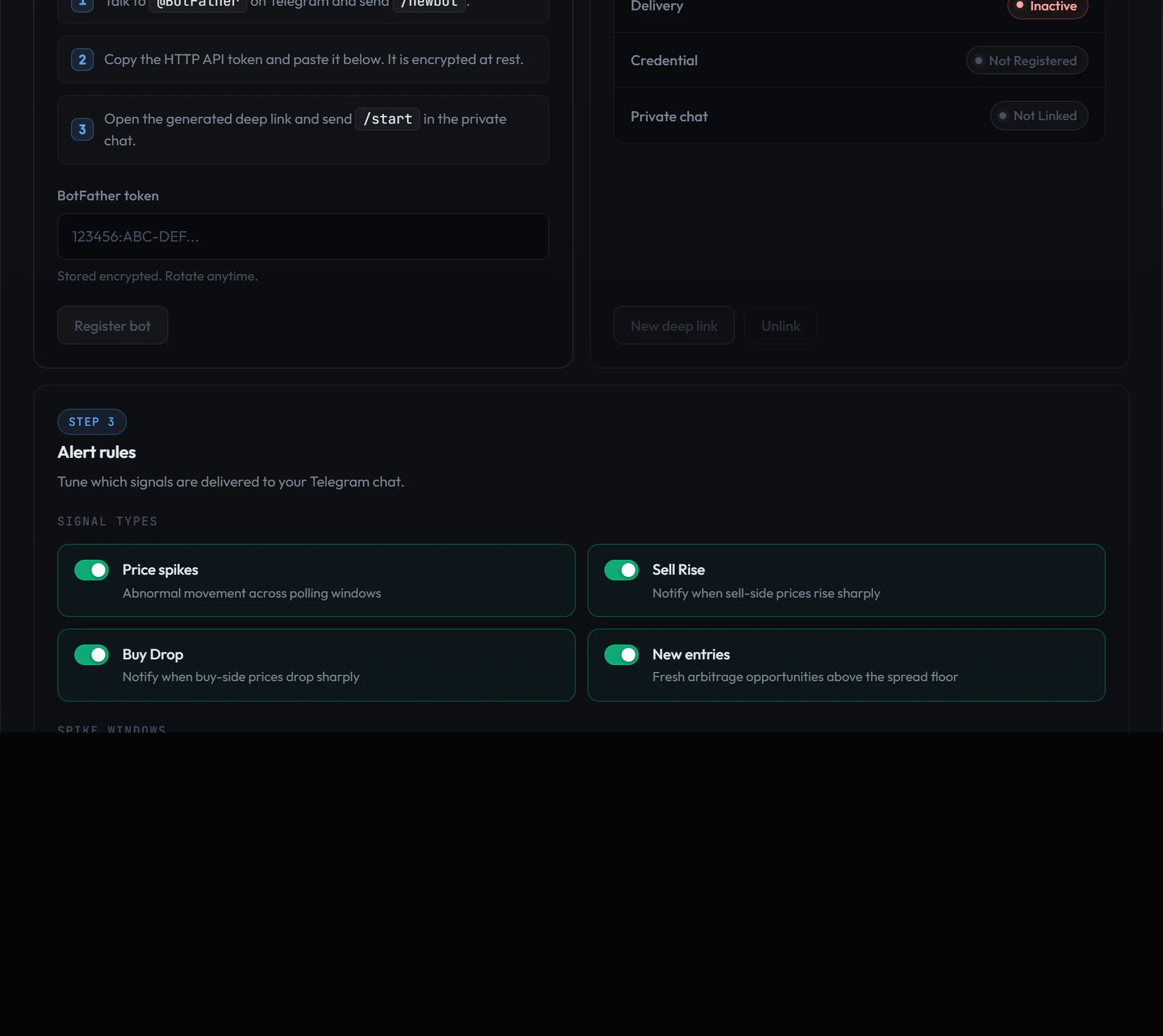
The Step 1 panel is titled Connect your bot with the description Create a dedicated bot with BotFather and register its token. It lists three instructions verbatim:
1. Talk to @BotFather on Telegram and send /newbot.
2. Copy the HTTP API token and paste it below. It is encrypted at rest.
3. Open the generated deep link and send /start in the private chat.In Telegram, message
@BotFather, send/newbot, pick a display name and a unique username for your bot, and BotFather replies with an HTTP API token that looks like123456:ABC-DEF.... Paste it into the field labeled BotFather token (a password-style input with placeholder 123456:ABC-DEF... and the hint Stored encrypted. Rotate anytime.), then press Register bot.Before anything is saved, the server checks the token against Telegram itself:
- The token must belong to a real bot. If it does not, registration fails with
Telegram token does not belong to a bot.
- The bot must not already be serving another service. If it has a webhook pointing somewhere else, registration fails withTelegram bot already has a foreign webhook.
- One bot per Web3Map account. If your account already has a bot registered, you getA Telegram bot is already registered for this account. Use Rotate or Unlink before registering a new bot.
- One account per bot token. A token already used by a different Web3Map account is rejected withThis Telegram bot token is already connected to another Web3Map account. Unlink it from that account first, or create a new bot with BotFather and register the new bot token.If validation passes, Web3Map sets the bot's webhook (with a per-bot secret), installs the full slash-command menu on the bot, switches the bot's menu button to that command list, and stores your token encrypted. The credential starts in the
pending_chatstate because no private chat is linked yet. Token registration is rate limited to 5 attempts per 5 minutes. - Open the deep link and send /start.
Right after registration the card shows a box with the kicker Deep link ready, an Expires timestamp in your local time, and the full link, shaped like
https://t.me/your_bot?start=.... The link expires after 10 minutes and allows at most 5 attempts. If it lapses, press New deep link in the Step 2 panel to issue a fresh one (issuing a new link revokes the previous pending one).Open the deep link. Telegram opens your private chat with the bot and sends
/startwith the link token attached. On success the bot replies with the confirmation and immediately shows the settings menu:Wmy_web3map_alerts_botbot/start14:02Web3Map premium Telegram alerts linked.
Telegram alert settings
Price spikes: on
Sell Rise: on
Buy Drop: on
New entries: on
New entries min spread: 1%
Choose a section below. 14:02Linking flips the credential to
active, records your private chat, and creates your default alert preferences (all signal types on, default windows and thresholds). You are now receiving alerts. - Tune your alert rules.
The Step 3 panel, Alert rules (Tune which signals are delivered to your Telegram chat.), is where you set which signals fire, per-window spike thresholds, the new-entry spread floor, and mute lists. It is covered in full in Alert rules (web). You can also change everything from inside the Telegram chat, see Command reference and Inline menus.
Tip: The bot you create is a normal Telegram bot that costs nothing and takes about a minute to make. Give it a name you will recognize, for example "My Web3Map Alerts". Only the HTTP API token matters to Web3Map.
Delivery status panel
The Step 2 panel is titled Delivery status with the description Live state of your Telegram credential and private chat. It shows three rows and two buttons. The panel refreshes every 30 seconds and again whenever you return to the browser tab.
- Delivery row
The single answer to "am I receiving alerts right now". Shows Active only when all three conditions hold at once: your premium entitlement is valid, the bot credential is
active, and a private chat is linked andactive. Anything else shows Inactive.- Credential row
Shows your bot as
@bot_usernameplus its raw status badge. Right after registering the token, before you send/start, the status ispending_chat. After linking it becomesactive. If no bot has been registered yet the row shows Not registered.- Private chat row
The state of the one-to-one chat link. Shows Not linked before you open the deep link and send
/start,activeonce linked, andpausedif delivery is paused (either you ran/pauseor you blocked the bot in Telegram).- New deep link button
Issues a fresh 10-minute deep link for the registered bot, revoking any previous pending link. Use it when the original link expired, when you hit the 5-attempt limit, or after a token rotation. Available only when a bot credential exists; otherwise the server replies
No reconnectable Telegram bot credential. Deep link issuance is rate limited to 10 requests per 5 minutes.- Unlink button
Full disconnect. Revokes the credential, the chat link, and any pending deep link, deletes the stored encrypted token, and removes the webhook from your bot. After unlinking, the bot is entirely yours again with no Web3Map configuration on it. To start over you re-register a token from Step 1.
| State | Where it appears | Meaning |
|---|---|---|
pending_chat | Credential | Token registered and webhook configured, but no private chat linked yet. Open the deep link and send /start. |
active | Credential and Private chat | Fully operational. Alerts are delivered as long as your plan stays active. |
paused | Private chat | Delivery suspended. Caused by your /pause command or by blocking the bot in Telegram. Recover with /resume. |
invalid | Credential | Telegram rejected the stored token (you revoked it in BotFather). The token is discarded; re-register or rotate from the web card. |
revoked | Both | You unlinked. Nothing is stored anymore. |
| Not registered / Not linked | Credential / Private chat | That stage of setup has not happened yet. |
Alert types and message anatomy
Two alert families share the same delivery pipeline and the same formatting conventions:
| Convention | Detail |
|---|---|
| One message per asset | All venues and windows for one asset are grouped into a single message. If the visible text would exceed 4096 characters, the message is split in two with HTML tags kept balanced. |
| Prices | USD prices at or above $1 render like $1,234.56. Below $1 they keep four significant digits. Prices with many leading zeros compress, for example $0.0(5)1234 means five zeros between the decimal point and 1234. KRW markets use ₩ with two decimals; BTC markets render like 0.00001234btc. |
| Venue labels | CEX spot is the exchange id, for example binance. A perpetual futures surface gets a .P suffix, for example binance.P. DEX venues use the DEX name, for example uniswap, with the chain shown separately. |
| Asset link | The symbol in the header is a hyperlink that opens the asset in the Web3Map graph. |
| Closing line | Every message ends with Time: YYYY-MM-DD HH:MM:SS UTC. |
Price spike messages
A price spike alert fires when a venue's price moves by at least your threshold inside one of the six polling windows. A first alert for an asset looks like this:
📈 [Sell Rise 30s, 5m] DRV +32.10%
⌛️ 30s:
uniswap | eth: +32.10%
Buy  | $0.0512 -> $0.0721
Sell | $0.0509 -> $0.0718
CA:
0x6ab1...93f2Pool:
0x9f3c...0c41CMC | DS | GMGN
binance | eth(D/W), ton(D): +29.84%
Buy  | $0.0510 -> $0.0703
Sell | $0.0508 -> $0.0699
CA:
eth:
0x6ab1...93f2CMC | DS | GMGN
ton:
EQDk...wq7RCMC
⌛️ 5m:
uniswap | eth: +41.02%
Buy  | $0.0489 -> $0.0721
Sell | $0.0486 -> $0.0718
CA:
0x6ab1...93f2Pool:
0x9f3c...0c41CMC | DS | GMGN
Time: 2026-06-12 14:02:31 UTC 14:02
Line by line:
- Header line
Direction icon (chart-up for Sell Rise, chart-down for Buy Drop), then the triggering windows in brackets, for example
[Sell Rise 30s, 5m], then the asset symbol as a link into the Web3Map graph, then the spike magnitude with sign. A Sell Rise shows a positive percentage; a Buy Drop shows a negative one, for example[Buy Drop 1h] SYMBOL -45.00%. When the alert is a continuation of an episode you were already alerted about, the elapsed time since the episode started is appended, for example(13m 20s).- Window subheaders
When two or more windows fired at once, each window gets its own bold subheader marked with an hourglass icon, for example
5m:, listed in ascending window order. A single-window alert skips the subheaders.- Venue line
One bold line per venue: venue name, a pipe, the chain in italics, then that venue's move, for example
uniswap | eth: +32.10%. Each window block lists every spiking CEX and perp venue plus the best DEX per chain, capped at 8 venues per window.- CEX chain labels with D/W markers
For CEX venues the chain list carries deposit and withdrawal markers, for example
eth(D/W), ton(D).Dmeans deposits are open on that chain,Wmeans withdrawals are open. A chain is listed only when its status is both enabled and fresh (updated within the last 5 minutes), so what you see is actionable, not stale exchange metadata.- Buy/Sell price block
A fixed-width block with two rows,
BuyandSell, each showing the previous price and the current price, for example$0.0512 -> $0.0721. Both sides are shown so you can see whether the spread itself widened or the whole book moved.CA:lineThe token contract address, rendered as tap-to-copy monospace. For multi-chain CEX venues the message shows a
CA:header followed by one italic chain label and address per chain, each with its own link row.Pool:lineDEX venues only: the pool address the quote came from, also tap-to-copy.
- Link row
CMC | DS | GMGN Bold external links in a fixed order: CMC opens CoinMarketCap (the currency page when a slug is known, otherwise CoinMarketCap's DEX token page), DS opens DEXScreener, GMGN opens gmgn.ai. Each link is rendered only when that service supports the chain, so some rows show fewer links. Native coins get no link row.
- Time line
Time: 2026-06-12 14:02:31 UTC. The snapshot timestamp of the alert in UTC.
From the second alert of an episode onward, the window block also appends a recap of the whole episode and a price trail:
- Recap line (circular-arrow icon)
+69.00% from start ($10.00 → $16.90)shows the cumulative move of the whole episode, from the price where the episode began to the latest alerted price. It appears once a window has alerted at least twice in the same episode.PA:price trail (chart icon)The episode's price progression, one point per alert (the window's extreme at each step), up to 6 points. Only the final segment is bold, so your eye lands on the latest move. PA stands for price action.
Note: threshold gating uses the live magnitude of the move, not a frozen snapshot value. If you run high thresholds, you are compared against the current size of the move at evaluation time.
New entry messages
A new entry alert fires when an arbitrage pair enters the live opportunity book above your minimum spread. The message is a compact briefing of the whole opportunity: what moved, the best executable route, both sides of the book, alternative routes, and the contract addresses.
[NEW ENTRY] TKN +12.30%
Mover: uniswap ▼ -4.8% (30s) | BUY side
$0.0538 -> $0.0512 | eth
CA:
0x4c11...9d2ePool:
0x84d0...77ab🌟 Best Route:📊 Price:
Buy: uniswap | eth | $0.0512
Sell: binance | ton | $0.0575
Bridge: stargate(eth->ton)
Gap: +12.3%
📈 BUY:
Venue     | Price   | Gap    | Chain(W)
uniswap   | $0.0512 | +12.3% | eth
binance   | $0.0518 | +11.0% | eth, ton
gate [FB] | $0.0524 | +9.7%  | -
+2 more venues
📉 SELL:
Venue     | Price   | Gap    | Chain(D)
binance   | $0.0575 | +12.3% | ton
okx       | $0.0561 | +9.6%  | eth
binance.P | $0.0566 | +10.5% | -
🌐 Route:
Route                 | Gap    | Bridge
eth -> ton            | +12.3% | stargate
eth                   | +9.6%  | -
eth -> Binance -> ton | +6.0%  | Binance
arb -> base           | +5.5%  | Unknown
CA:
eth:
0x4c11...9d2eCMC | DS | GMGN
ton:
EQDk...wq7RCMC
Time: 2026-06-12 14:02:31 UTC 14:02
Line by line:
- Header line
[NEW ENTRY], then the asset symbol as a graph link, then the largest gap found in the venue tables below.- Gap maintained: line (persistent entries)
When the gap is still open but prices have not moved recently, the message replaces the mover block with a single bold line such as
Gap maintained: 1h 5m, telling you how long the spread has survived.- Mover: block (fresh entries)
When the entry is fresh, a bold line names the venue that moved, the direction triangle, the 30-second move, and which side of the book it affects: an up triangle means a rising price on the SELL side, a down triangle means a falling price on the BUY side. The second line shows the previous and current price with the chain in italics. If the mover is a DEX, tap-to-copy
CA:andPool:lines follow. If a fresh entry's gap has also been open for more than 5 minutes, an extraGap maintained:line is added.- Best Route: blockquote (star icon)
A bold quoted block with up to four lines:
Buy:venue, chain, and price;Sell:venue, chain, and price;Bridge:how value moves between the two legs;Gap:the spread of this specific route. The bridge can be a protocol such asstargate(eth->ton), a CEX relay where the exchange itself moves the asset between chains, written likeBinance(eth->ton), orunknownwhen no known path exists. When both legs sit on the same token and chain, theBridge:line is omitted entirely. Route discovery walks the token-level bridge topology plus CEX deposit/withdraw relays, and only counts deposit/withdraw legs whose status is fresh and enabled.- Price: section,
BUYandSELLtables Two fixed-width tables sharing the same column widths:
Venue | Price | Gap | Chain(W)for the buy side andVenue | Price | Gap | Chain(D)for the sell side.Chain(W)lists the chains you can withdraw to after buying at that venue;Chain(D)lists the chains you can deposit from before selling there. Only fresh and enabled chains are listed;-means none qualify right now, and perp venues always show-because there is nothing to move on-chain.[FB]after a venue name marks a fallback price, meaning the primary quote source was unavailable and a secondary one was used. Each side lists up to 12 venues (every CEX plus the best DEX per chain take priority), with a+N more venuesline when the book is deeper. Exchanges that could not form a pair but still have a fresh price are included for comparison, with their gap computed against the global best counterparty.- Route: table (globe icon)
Alternative routes ranked by gap, formatted
Route | Gap | Bridge. A single chain id means a same-chain route with no bridge (-). Multi-hop routes show the path, for exampleeth -> Binance -> tonwith the CEX named in the Bridge column, orarb -> basewithUnknownwhen no known bridge connects the legs. Only routes with a gap of at least 5% are listed, up to 8 rows.CA:sectionThe closing section lists one contract address per chain, with the chain in italics and the address in tap-to-copy monospace. Tokens that belong to the Best Route legs claim their chain's slot first. Each address gets its own external link row.
- External links
CMC | DS | GMGN Fixed order. CMC is CoinMarketCap, DS is DEXScreener, GMGN is gmgn.ai. A link only renders when that service supports the chain, which is why the
tonaddress above shows only CMC. Native coins get no link row at all.
Tip: the Chain(W) and Chain(D) columns are the fastest way to sanity-check a route before you act: if the chain you need is missing from the column, the exchange's deposit or withdrawal for that chain is currently closed or its status is stale.
When alerts fire and when they repeat
Alert volume is controlled by episode logic, not by blunt time cooldowns. The goal: never send you the same information twice, and never go quiet while a move is still developing.
Price spikes: per-user episodes
Each spike episode is tracked per user and per asset, with anchors per window and venue. The anchor is the last price you were actually alerted at, not a global market reference:
- First alert: fires when a window's live move reaches your threshold for that window and no live episode exists for you yet.
- Follow-up alert: fires only when the price moves again, in the same direction, by at least your threshold, measured from your last alerted price. The follow-up shows that anchor as the previous price, the percentage relative to it, and the elapsed time since the episode started in the header, for example
(13m 20s). - Episode expiry: after 1 hour with no further qualifying move, the episode ends. The next spike on that asset starts a fresh episode with a fresh first alert.
- Windows are independent: a 30s episode and a 5m episode on the same asset can fire separately; when several windows qualify at the same moment they are merged into one message with per-window subheaders.
- No duplicate content: the send gate is content newness. A message whose venue legs and trail end-point are identical to what you already received is suppressed, while a genuinely progressed episode or a different window passes immediately. Anchors only advance when an alert is actually scheduled to you, so a failed delivery never silently eats an alert.
This is why you do not get ten identical messages during a sideways wobble: each follow-up requires a full additional threshold-sized move from the exact price you last saw.
New entries: recency gate plus cooldowns
- First alert: sent when a qualifying pair entered the opportunity book within the last hour. Entries older than that are never alerted as new.
- Re-alerts: while an entry stays fresh (the gap appeared less than 5 minutes ago, or a venue printed a 30-second move of at least 1%), it can re-alert at most once per hour. Once it turns persistent (the gap survives without fresh movement), re-alerts slow to at most once every 2 hours, and the message shows the
Gap maintained:line instead of a mover. - Phantom guard: if the best buy and best sell are the same venue, no alert is sent at all.
Note: every threshold in this section is evaluated against your settings: your per-window spike thresholds and your new-entry minimum spread. Two users watching the same market can receive completely different alert streams.
Alert rules on the web
The Step 3 panel Alert rules (Tune which signals are delivered to your Telegram chat.) is the full-width control surface for everything the bot delivers. Changes are collected locally and applied only when you press Save changes; the footer reminds you with Changes apply only after you save.
Signal types
Four master toggles, all on by default:
- Price spikes
Description on screen: Abnormal movement across polling windows. The master switch for the whole spike family. Off means no spike alerts regardless of window settings.
- Sell Rise
Notify when sell-side prices rise sharply. Direction toggle: alerts where the sell price ran up (an opportunity to sell high).
- Buy Drop
Notify when buy-side prices drop sharply. Direction toggle: alerts where the buy price fell hard (an opportunity to buy low).
- New entries
Fresh arbitrage opportunities above the spread floor. The master switch for new-entry alerts.
Spike windows
Six cells, one per window, each with an on/off checkbox and a percentage threshold input (minimum 10). The window labels read 30 s window, 1 min window, 5 min window, 15 min window, 30 min window, and 1 hour window.
| Window | Default state | Default threshold |
|---|---|---|
| 30 s | On | 30% |
| 1 min | Off | 10% |
| 5 min | On | 50% |
| 15 min | Off | 10% |
| 30 min | Off | 10% |
| 1 hour | On | 95% |
The shape of the defaults is deliberate: short windows need violent moves to matter (30% in 30 seconds), while the 1 hour window only speaks up for near-doubles (95%). Thresholds below 10% are rejected by the server with Price spike threshold must be >= 10. If you type something that is not a number, the card shows Spike threshold for {window} must be a valid number.
New entries minimum spread
The field labeled New entries minimum spread takes a percentage with a floor of 1 (default 1%). Entries below your floor are never delivered. Values below 1 are rejected with Telegram new entries min spread must be >= 1; non-numeric input shows New entries min spread must be a valid number.
Mute lists
Two collapsible groups, one per alert family, and they are fully independent of each other:
- New entries group
Description: Suppress new-entry alerts by token, CEX, or chain. Hint under the token input: Enter one exact token symbol at a time. Mutes new-entry alerts only, not price spikes.
- Price spikes group
Description: Suppress price-spike alerts by token, CEX, or chain. Hint: Price-spike mutes start empty and do not inherit new-entry mutes. Muting a token for new entries does nothing to its spike alerts, and vice versa.
Each group has three tabs, Tokens, CEX, and Chains, with per-tab count badges and chip tags TKN, CEX, and NET. The group header shows None or {n} muted, plus an Unsaved badge while you have pending edits. Inputs are exact-match only:
- Tokens: placeholder Exact token symbol. The symbol must resolve to exactly one asset; a typo, an unknown symbol, or an ambiguous one returns Enter the exact token symbol.
- CEX: placeholder binance. Unknown exchange ids are rejected with
Unknown CEX id. - Chains: placeholder polygon. Unknown chain ids are rejected with
Unknown chain id.
Press Hide (or Enter) to add, press Unhide on a chip to remove. An empty tab shows Nothing muted yet. Limits per list: 1000 tokens, 100 CEXes, 200 chains; exceeding the token limit shows Hidden asset limit reached.
Saving
The Save changes button applies everything at once and then enters a 30 second cooldown, during which the footer shows Next save available in {n}s. Nothing takes effect before you save.
Heads up: the web card and the Telegram bot edit the same underlying settings, but their semantics differ. The web card stages changes until you save. The bot's inline menu toggles and numeric edits also stage to a draft, but its hide and unhide prompts and all text commands apply immediately. See the next two sections.
Command reference
Most of the command list is installed on your bot at registration time, so Telegram's command menu (the / button) autocompletes them. A few commands (/start, /settings, /help, /cancel, /spikes, /newentries, /unlink) are recognized when typed but do not appear in the autocomplete menu. Anything the bot does not recognize answers with the help text.
Important: text commands apply immediately to your live settings. There is no draft and no save step. Only the inline menu toggles and numeric edits (see Inline menus) stage changes in a draft until you press Save changes; the menus' hide and unhide prompts also apply immediately.
Session and navigation
| Command | What it does | Applies |
|---|---|---|
/start | With a deep link token: links this private chat to your Web3Map account and replies Web3Map premium Telegram alerts linked. Without arguments in an already linked chat: opens the settings menu. | Immediate |
/menu | Opens the settings root menu. | Navigation |
/settings | Same as /menu. | Navigation |
/help | Prints the command help text. Unrecognized commands print the same help. | Read-only |
/status | Replies with the credential and chat link state, for example Telegram alerts: credential=active link=active. | Read-only |
/cancel | Cancels a pending menu input (such as a threshold prompt) and returns to the root menu with Input cancelled. Draft preserved. While an input is pending, plain text cancel works too. | Immediate |
Delivery control
| Command | What it does | Applies |
|---|---|---|
/pause | Pauses delivery. Reply: Telegram alerts paused. Use /resume to enable the next snapshot cycle. Your settings are untouched. | Immediate |
/resume | Resumes delivery from the next snapshot cycle: Telegram alerts resumed for the next snapshot cycle. Requires an active premium entitlement, otherwise Premium entitlement is required to resume Telegram alerts. | Immediate |
/unlink | Disconnects completely: revokes the credential and chat link, deletes the stored token, and removes the webhook from your bot. Reply: Telegram alerts unlinked. Reconnect from Web3Map account settings. | Immediate |
Price spike settings
Window arguments are given in seconds: 30, 60, 300, 900, 1800, or 3600 (30s, 1m, 5m, 15m, 30m, 1h). Every successful command replies with a summary of your current settings.
| Command | What it does | Applies |
|---|---|---|
/spikes on|off | Master toggle for the spike family. | Immediate |
/spikes rise on|off | Toggles the Sell Rise direction (rising is accepted too). | Immediate |
/spikes drop on|off | Toggles the Buy Drop direction (dropping is accepted too). | Immediate |
/spikes window <seconds> on|off | Enables or disables one window, for example /spikes window 300 on. An unsupported value replies Unsupported price spike window: {n}. | Immediate |
/spikes threshold <seconds> <pct> | Sets one window's threshold, for example /spikes threshold 30 25. Values below 10 reply Price spike threshold must be >= 10. | Immediate |
Malformed input replies with the usage line: Usage: /spikes on|off, /spikes rise on|off, /spikes drop on|off, /spikes window <seconds> on|off, /spikes threshold <seconds> <pct>.
New entry settings
| Command | What it does | Applies |
|---|---|---|
/newentries on|off | Master toggle for new-entry alerts. | Immediate |
/newentries min <pct> | Sets the minimum spread floor. Values below 1 reply Telegram new entries min spread must be >= 1. | Immediate |
The same command also routes mute subcommands (/newentries hide SOL behaves like /hide SOL). Malformed input replies Usage: /newentries on|off, /newentries min <pct>, /newentries hide <SYMBOL>, /newentries unhide <SYMBOL>, /newentries hidden.
New-entry mute commands
| Command | What it does | Applies |
|---|---|---|
/hide <SYMBOL> | Mutes a token for new entries. Reply: {SYMBOL} hidden for new entries. Already muted: {SYMBOL} is already hidden for new entries. Over the cap: Hidden asset limit reached (1000 assets). | Immediate |
/unhide <SYMBOL> | Unmutes: {SYMBOL} unhidden for new entries. If it was not muted: {SYMBOL} was not hidden for new entries. | Immediate |
/hidden | Shows the New entries Hidden List. Empty list replies No hidden tokens yet. with the example Use /hide SOL to suppress future new-entry alerts for a token. | Read-only |
/hide_cex <CEX_ID> | Mutes an exchange for new entries, for example binance hidden for new entries. Cap: Hidden CEX limit reached (100 entries). | Immediate |
/unhide_cex <CEX_ID> | Unmutes the exchange. | Immediate |
/hidden_cex | Shows the New entries Hidden CEX List. | Read-only |
/hide_chain <CHAIN_ID> | Mutes a chain for new entries. Cap: Hidden chain limit reached (200 entries). | Immediate |
/unhide_chain <CHAIN_ID> | Unmutes the chain. | Immediate |
/hidden_chain | Shows the New entries Hidden chain List. | Read-only |
Price-spike mute commands
The spike_ prefix manages the separate price-spike lists. Replies follow the same patterns with hidden for price spikes. wording, and the list titles are Price spike Hidden List, Price spike Hidden CEX List, and Price spike Hidden chain List.
| Command | What it does | Applies |
|---|---|---|
/spike_hide <SYMBOL> | Mutes a token for price spikes. | Immediate |
/spike_unhide <SYMBOL> | Unmutes the token for price spikes. | Immediate |
/spike_hidden | Shows the Price spike Hidden List. | Read-only |
/spike_hide_cex <CEX_ID> | Mutes an exchange for price spikes. | Immediate |
/spike_unhide_cex <CEX_ID> | Unmutes the exchange for price spikes. | Immediate |
/spike_hidden_cex | Shows the Price spike Hidden CEX List. | Read-only |
/spike_hide_chain <CHAIN_ID> | Mutes a chain for price spikes. | Immediate |
/spike_unhide_chain <CHAIN_ID> | Unmutes the chain for price spikes. | Immediate |
/spike_hidden_chain | Shows the Price spike Hidden chain List. | Read-only |
Heads up: mute arguments are exact-match only, case-insensitive for token symbols. A symbol that matches zero assets or more than one replies Enter the exact token symbol. Exchange and chain arguments must be exact ids (Enter the exact CEX id. / Enter the exact chain id.). Commands are rate limited to 30 per minute per chat; exceeding it replies Too many Telegram commands. Try again in {n}s.
A few exchanges in practice:
/status14:10/pause14:11/resume14:12/hide SOL14:13/hidden14:13- SOL
- PEPE
Use /hide SYMBOL or /unhide SYMBOL. 14:13
Mute lists
There are exactly six mute lists, and they are all independent of one another. The new-entry lists and the price-spike lists never share entries: muting a token for new entries does not silence its spikes, and the price-spike lists start empty rather than inheriting anything.
| List | Silences | Limit | Bot commands |
|---|---|---|---|
| New-entry tokens | The whole asset's new-entry messages | 1000 | /hide, /unhide, /hidden |
| New-entry CEX | That exchange's rows inside new-entry messages | 100 | /hide_cex, /unhide_cex, /hidden_cex |
| New-entry chains | That chain's rows inside new-entry messages | 200 | /hide_chain, /unhide_chain, /hidden_chain |
| Price-spike tokens | The whole asset's spike messages | 1000 | /spike_hide, /spike_unhide, /spike_hidden |
| Price-spike CEX | That exchange's venue blocks inside spike messages | 100 | /spike_hide_cex, /spike_unhide_cex, /spike_hidden_cex |
| Price-spike chains | That chain's venue blocks inside spike messages | 200 | /spike_hide_chain, /spike_unhide_chain, /spike_hidden_chain |
How muting changes what you receive: a muted token removes the entire message for that asset. A muted CEX or chain does not drop the message; it removes the matching venue or chain rows, so the alert is rebuilt without them.
You can manage every list from three places, and they all write to the same data:
- The web card: the Mute lists groups in Alert rules on My Page (staged, applied on Save changes).
- Bot commands: the slash commands in the table above (applied immediately).
- Inline menus: the Hide token / Hide CEX / Hide chain prompts and hidden list screens (applied immediately).
Tip: the eye icon on cards in the Arbitrage dashboard writes to these same lists for premium accounts. Hiding an asset on the web mutes it on Telegram and vice versa, so your view of the opportunity book and your alert stream stay consistent.
Note: mute lists belong to your account, not to your bot credential. They survive Unlink and relinking, so reconnecting a new bot months later restores your exact mute configuration. Entries are exact-match only; there are no wildcards.
Pausing, breaking, and recovering
Every way delivery can stop, and the exact way back:
| Situation | What happens | How to recover |
|---|---|---|
You send /pause |
The chat link switches to paused. No alerts are delivered; settings are preserved. |
Send /resume. Delivery restarts on the next snapshot cycle. |
| You block the bot in Telegram | Telegram rejects deliveries, and Web3Map automatically pauses the link (blocked-bot reason). No retries pile up against a blocked chat. | Unblock the bot in Telegram, then send /resume. |
| Your Pro time runs out | You drop out of the eligible delivery set and alerts stop. Your bot, link, and settings remain stored. | Add time on My Page, then send /resume if needed. Without an active plan /resume replies Premium entitlement is required to resume Telegram alerts. |
| You revoke the bot token in BotFather | Telegram starts rejecting the stored token, the credential is marked invalid, and the stored token is discarded. |
Re-register from the web card: generate a new token with BotFather (/token for the same bot, or /newbot for a fresh one) and submit it again. |
| You want a new token for the same bot | Press Rotate or reconnect in Step 1. The main button becomes Rotate token and the toggle becomes Cancel rotation. The replacement must belong to the same bot; a different bot's token is rejected with Replacement token must belong to the same Telegram bot. |
After rotation, the card shows a fresh deep link box if relinking is needed. Rotation shares the 5-per-5-minutes registration rate limit. |
| You want out completely | Send /unlink or press Unlink on the web. The token is deleted, the webhook is removed from your bot, and all link state is revoked. |
Re-run the setup from Step 1 whenever you want back in. Your mute lists and alert rules are still there. |
Note: deliveries are queued with automatic retries (up to 10 attempts per message) and respect Telegram's backoff instructions, so a brief Telegram outage does not lose alerts that are still fresh.
Security model
Token encrypted at rest
Your BotFather token is encrypted before storage; only the ciphertext and a keyed fingerprint are kept. Tokens are masked in logs. Unlink deletes the ciphertext and removes the webhook from your bot.
Webhook verification
Your bot posts updates to a unique per-credential URL, and every request must carry a secret token that Web3Map verifies before processing. Updates queued before registration are dropped, and duplicate updates are ignored.
One-shot deep links
Link tokens live 10 minutes, allow 5 attempts, and are revoked the moment a new one is issued. A consumed or expired link cannot be replayed.
One bot, one account
Each Web3Map account holds at most one active bot credential, and each bot token can serve at most one Web3Map account. Rotation only accepts a new token for the same bot.
Multiple accounts, multiple bots
One Telegram user can link several Web3Map accounts, but each account needs its own separate bot. You cannot point two Web3Map accounts at the same bot, even from the same Telegram profile.
Treat the token like a password
Anyone holding your bot token can send and read messages as your bot. Keep it private, and if you ever pasted it anywhere else, rotate it via BotFather and Rotate or reconnect.
Troubleshooting
Exact messages you may encounter, what they mean, and what to do:
| Message | Why it happens | Fix |
|---|---|---|
Telegram token does not belong to a bot |
The pasted string is not a valid bot token (truncated copy, a user API key, or random text). | Re-copy the HTTP API token from your BotFather chat. It looks like 123456:ABC-DEF.... |
Telegram bot already has a foreign webhook |
That bot is already wired to another service; Web3Map refuses to hijack it. | Create a fresh bot with /newbot just for Web3Map, or remove the other service's webhook first. |
A Telegram bot is already registered for this account. Use Rotate or Unlink before registering a new bot. |
One bot per account, and your account already has one. | Use Rotate or reconnect for a new token of the same bot, or Unlink first to switch to a different bot. |
This Telegram bot token is already connected to another Web3Map account. Unlink it from that account first, or create a new bot with BotFather and register the new bot token. |
One bot token per account, and this token is in use elsewhere (often your own second account). | Unlink it from the other account, or make a new bot and register that token instead. |
Invalid or expired Web3Map Telegram link token. |
The /start token was already consumed, mangled, or does not match a pending link. |
Press New deep link on My Page and open the fresh link. |
Telegram link token expired. Request a new link from Web3Map. |
More than 10 minutes passed since the deep link was issued. | Press New deep link and use it promptly. |
Telegram link token attempt limit reached. Request a new link from Web3Map. |
The same link was tried more than 5 times. | Press New deep link for a fresh token. |
This Telegram credential is not ready for linking. |
The credential is not in a linkable state (for example it was revoked in the meantime). | Check the Delivery status panel; re-register the bot if the credential row shows Not registered or invalid. |
Premium entitlement is required to link Telegram alerts. |
Your plan lapsed between registering the token and sending /start. |
Renew Pro on My Page, then open a fresh deep link. |
Premium entitlement is required to resume Telegram alerts. |
/resume was sent without an active plan. |
Add Pro time, then send /resume again. |
This private chat is not linked yet. followed by Open the current Web3Map Telegram deep link from your premium account settings. After linking, this chat will open the settings menu automatically. You can return with /menu. |
You messaged the bot before completing the deep link handshake. | Open the deep link from My Page so /start carries the link token. |
Too many Telegram commands. Try again in {n}s. |
More than 30 commands in 60 seconds from this chat. | Wait the indicated seconds; the limit resets continuously. |
Save is rate limited. Try again in {n}s. |
Menu drafts can be saved at most once every 30 seconds. | Wait, then press Save changes again. The draft is preserved. |
Telegram alert rate limit exceeded |
Web-side limits hit: token registration or rotation more than 5 times in 5 minutes, deep links more than 10 times in 5 minutes, or preference saves more than once per 30 seconds. | Pause for a few minutes and retry. |
Enter the exact token symbol. |
The symbol matched zero assets or more than one; mutes require an unambiguous exact match. | Check the exact symbol spelling as shown in alerts or in the app, then retry. |
No reconnectable Telegram bot credential |
New deep link was requested with no registered bot. | Register a bot token in Step 1 first. |
Telegram alerts paused. Use /resume to enable the next snapshot cycle. |
Confirmation that delivery is paused (this is the /pause reply, and the state you are in until resumed). |
Send /resume when you want alerts back. |
If alerts simply stopped arriving, run through this order: send /status to the bot and read the credential and link states; check the Delivery row on My Page (it must say Active); confirm your plan has time remaining; make sure you did not block the bot; then review your thresholds and mute lists. A 95% threshold on the 1 hour window or a muted chain is the most common "silent" cause.