Introduction
What Web3Map is, the four surfaces of the app, and where to go next.
Web3Map is a realtime cross-venue price intelligence product. It indexes prices for the same asset across four kinds of sources at once: centralized exchange (CEX) spot markets, CEX perpetual futures markets, decentralized exchange (DEX) liquidity pools, and the cross-chain bridges that connect them. The system continuously compares those prices, flags positive spreads, detects newly opened gaps, and tracks sudden price spikes, then presents all of it in a dashboard you can read at a glance.
Prices on Web3Map are not top-of-book quotes. Every displayed price is the effective execution price of a $1,000 fill on that venue, so a thin DEX pool and a deep CEX orderbook are compared on equal footing. Panels that use this convention carry a $1000 basis annotation.
Signals are not instructions. Web3Map is a monitoring and intelligence tool. It does not place orders for you, and it does not promise that any spread is capturable. Spreads decay in seconds, transfers can be blocked, and tokens with the same symbol can be different contracts. Always run the checks in Safety and troubleshooting before acting on anything you see here.
The four surfaces
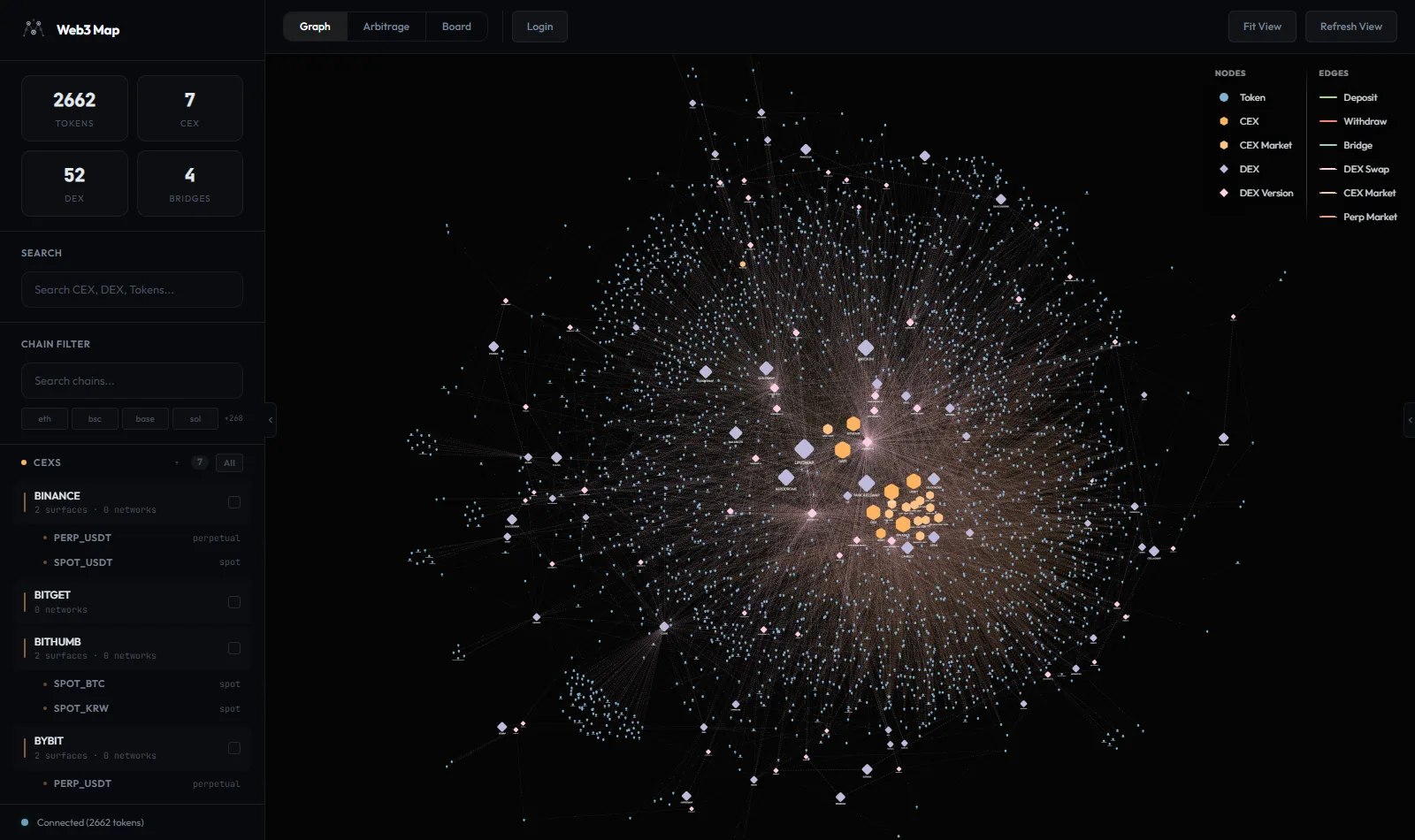
Graph
An interactive network map of every tracked token, exchange, DEX, and the deposit, withdraw, and bridge connections between them. Clicking a token opens Token Flow, a focused view of that asset with live buy and sell price rankings across all of its venues. Read the full guide at Graph & Token Flow.
Arbitrage
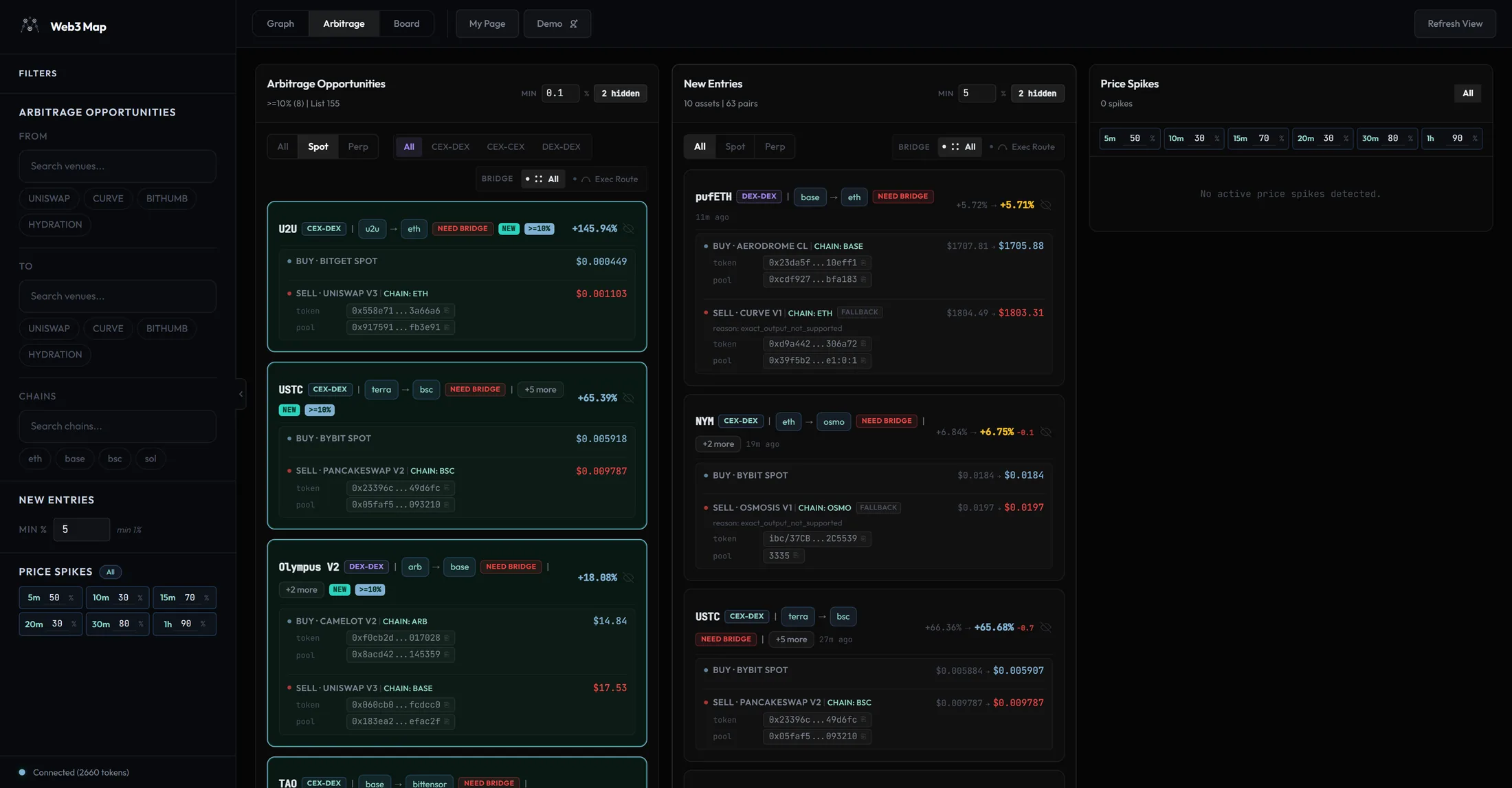
A three-panel dashboard: Arbitrage Opportunities (live positive spreads grouped per asset), New Entries (gaps that appeared within the last hour), and Price Spikes (sudden moves across short time windows). Read the full guide at Arbitrage dashboard.
Board
A community board for suggestions, data issue reports, bug reports, and general feedback. Anyone can read; posting requires a signed-in account. Official replies from the team are marked on the post. Full guide in the Community board section below.
My Page
Your account hub: display name, connected sign-in methods (email and wallet), current plan overview, Membership Plans with live Pro pricing, and the Premium Alerts Telegram setup for Pro accounts. Read the full guide at Account & billing.
Quick start
You can get value out of Web3Map in your first minute, without an account. This is the recommended first session, from guest browsing to Pro alerts.
- Open the dashboard.
Go to
/arbitrage. No sign-up is needed: the app creates a guest session for you automatically, and guests read the public data feed. While you are a guest the toolbar shows a Login button. Everything you see is live; public data refreshes every 60 seconds. Guide: Arbitrage dashboard. - Read an opportunity card.
Each row in Arbitrage Opportunities is one asset. The card shows the asset symbol, a type badge such as CEX-DEX or CEX-CEX, the chain route, and the spread percentage on the right. Below the header, the card lists the legs: Buy · {VENUE} with the buy price and Sell · {VENUE} with the sell price, and a +{N} more button expands additional venue pairs for the same asset. Badges such as Bridge, Need bridge, and NEW qualify the route. The full card anatomy is in the Arbitrage dashboard guide.
- Open the Graph.
Click any asset symbol on a card. The app switches to the Graph view and opens Token Flow for that asset: its chains, exchanges, DEX pools, bridge paths, and a price panel ranking every Buy and Sell venue at the $1000 basis. You can also browse the whole network directly at
/graph. Guide: Graph & Token Flow. - Create an account.
Open
/loginand pick the Sign Up tab. You can register with EMAIL, PASSWORD (minimum 4 characters), and NICKNAME (2 to 32 characters), or press Sign in/up with Wallet to create the account from an OKX Wallet or MetaMask signature instead. A signed-in account can post on the board, and your hidden-asset choices sync to the server. Guide: Account & billing. - Upgrade in My Page when ready.
Open My Page from the toolbar and scroll to Membership Plans. The Pro card shows live pricing and a Start Pro button. Payment is a one-time purchase of access time in USDC on the Base network; there is no subscription and no auto-renewal. Guide: Account & billing.
- Connect Telegram (Pro).
With an active Pro plan, the Premium Alerts section appears in My Page. Register your own Telegram bot there to receive price spike and new entry alerts in a private chat. The condensed steps are in Telegram setup and supported commands below; the full reference is the Telegram alerts guide.
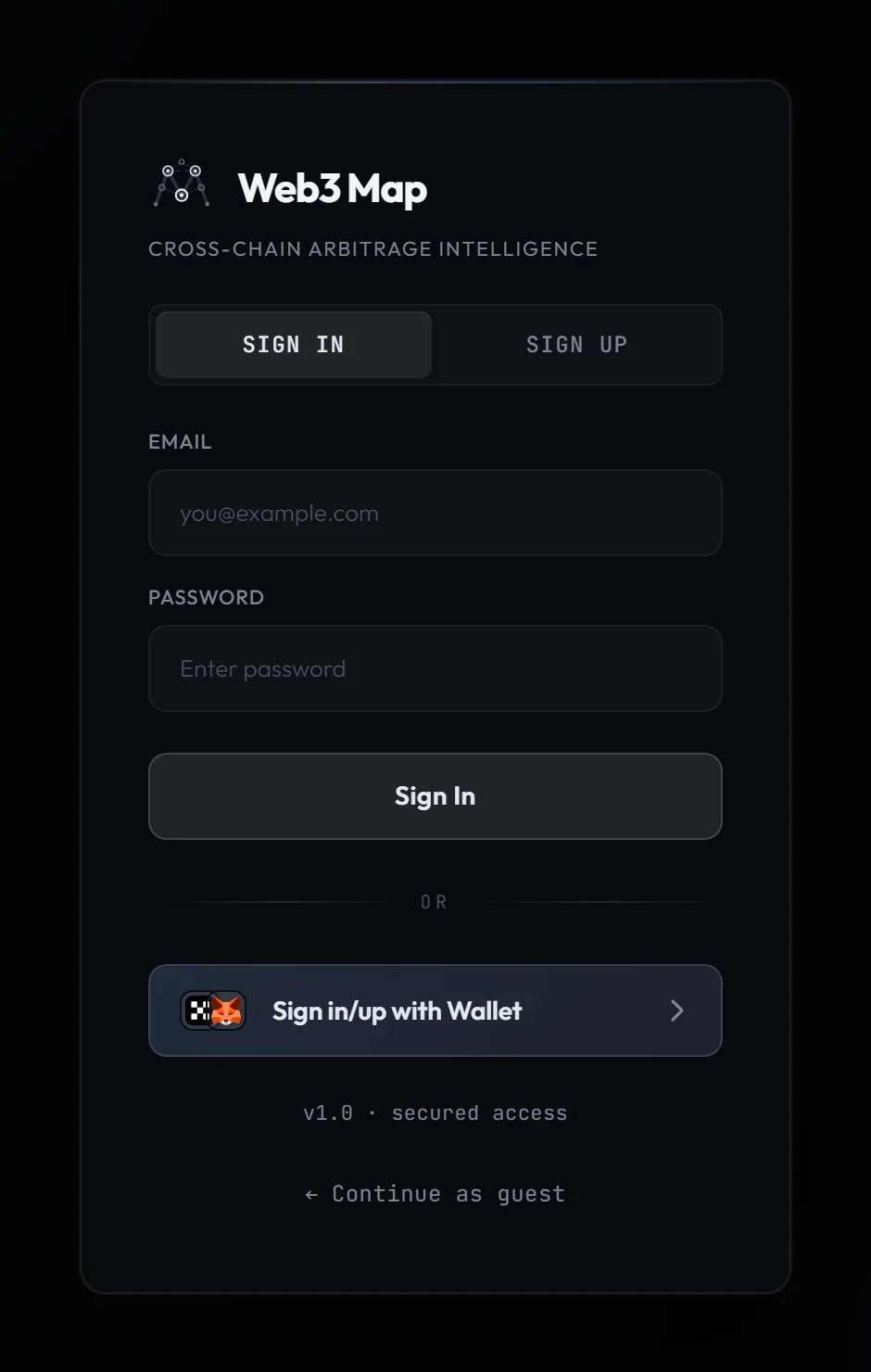
/login page. Tabs switch between Sign In and Sign Up; below the divider are Sign in/up with Wallet and, when you arrive at /login directly, ← Continue as guest.Tip: Hiding an asset with the eye icon while you are a guest only saves to your browser. Once you sign in, hidden assets sync to your account, follow you across devices, and (on Pro) also suppress the matching Telegram alerts.
Main app pages
Web3Map is a small set of URLs. The three main views share one toolbar with a Graph / Arbitrage / Board switcher (each entry is a real link, so Ctrl or Cmd click opens a new tab), plus Refresh View and, outside the Arbitrage view, Fit View actions. When you are away from the Arbitrage view, its toolbar entry shows a count badge for new entries and spikes you have not seen yet.
| URL | What it shows | Account requirement |
|---|---|---|
/ |
Marketing landing page with a product overview, a Free vs Pro pricing section, and entry buttons into the app. | None |
/graph |
Graph view: the network topology of assets, CEXes, and DEXes, with the Token Flow overlay for any selected asset. | None. A guest session is created automatically. |
/arbitrage |
Arbitrage dashboard: Arbitrage Opportunities, New Entries, and Price Spikes panels. | None to read the public feed. Pro unlocks filters and full detail. |
/board |
Community board: suggestions, data issues, bug reports, general feedback, and official replies. | None to read. A signed-in account is required to post or comment. |
/mypage |
My Page: profile, Connected Methods, plan overview, Membership Plans, and Premium Alerts (Pro). | Signed-in account. Guests are redirected to /login. |
/login |
Sign in or sign up with email or wallet, complete a one-time account migration if prompted, or continue as guest. | None |
/docs |
This documentation. | None |
Asset deep links. The URL /graph?asset={id} opens the Graph view
and immediately loads that asset's Token Flow. Asset symbols on arbitrage cards link in this
format, which is why Ctrl or Cmd clicking a symbol opens the asset in a fresh tab. After the
flow opens, the app cleans the ?asset= parameter out of the address bar.
Core concepts
These terms appear on every screen. Understanding them once makes the rest of the product self-explanatory.
- Asset
-
One logical token tracked across the whole map. An asset usually has several member tokens, one contract per chain, plus listings on multiple exchanges. Cards, alerts, and hide buttons all operate at the asset level, so hiding an asset hides every venue pair for it.
- Venue
-
Any single price source. A CEX exposes one or more surfaces, distinct markets within the same exchange, such as USDT spot, KRW spot, or a perp market; venue labels include the surface, for example BINANCE SPOT, UPBIT KRW, or BINANCE PERP. A DEX is identified down to the protocol version and chain, for example UNISWAP V3 on
eth. Deposit and withdraw status is tracked per surface, not just per exchange. - Bridge and route
-
When the buy and sell legs sit on different chains, you need a bridge. Each opportunity is flagged: Bridge means a bridge route between the chains is known to exist, Need bridge means none is known. The Exec Route filter keeps only rows that either need no bridge or have a known route. Perp rows are exempt from bridge filtering because perp positions are margin based and require no token transfer. On Pro, bridge rows are enriched with live fee, estimated transfer time, and remaining credit.
- Spread
-
The relative gap between the buy leg and the sell leg, computed in basis points (1 bps = 0.01%) and displayed as a percentage such as +5.20%. Because every price is a $1,000 fill quote, the spread already reflects realistic execution at that size, not the best printed tick.
- Freshness and staleness
-
Every price and status carries an age. Price rows that go stale are rendered at half opacity and are excluded from spread calculations. Deposit and withdraw status is graded fresh (under 3 minutes old), warning (3 to 5 minutes), or stale (over 5 minutes); stale status is treated as a failure, not as "probably still fine".
- Audience (public vs premium)
-
Your session is either public (guests and Free accounts) or premium (Pro). Public sessions refresh data every 60 seconds and read a snapshot that is released about 3 seconds after the internal system produces it. Premium sessions refresh every 30 seconds from the premium feed. The public response also omits premium-only fields: token contract addresses, pool ids, fallback reasons, full venue identity, and bridge fee, time, and credit figures.
- New entry
-
An opportunity that the system flagged as newly entered and whose first appearance is within the server's new-entry window (default 1 hour). The New Entries panel sorts these by detection time, shows how long ago each was detected, and displays the spread at detection next to the current spread so you can see whether the gap is widening or closing.
- Price spike: Buy Drop
-
A Buy Drop fires when the price you can buy at right now has fallen sharply against the recent baseline. The math: previous sell price minus current buy price, divided by the previous sell price. It is shown as a negative percentage, for example -25.51%. In plain words: the asset just got much cheaper to buy than it was selling for moments ago.
- Price spike: Sell Rise
-
A Sell Rise fires when the price you can sell at right now has jumped sharply against the recent baseline. The math: current sell price minus previous buy price, divided by the previous buy price. It is shown as a positive percentage. In plain words: the asset just became much more valuable to sell than it cost to buy moments ago. Spikes are measured over fixed windows from 30 seconds to 1 hour, each with its own minimum percentage threshold.
- Kimchi Premium vs KR Premium
-
Two sub-filters for CEX-to-CEX opportunities involving Korean exchanges (Upbit and Bithumb). Kimchi Premium: exactly one leg is on a Korean exchange. KR Premium: both legs are on Korean exchanges. The tabs appear under the CEX-CEX sub-tab in the opportunities panel.
- Hard gate
-
The system's core safety rule: if a status cannot be confirmed (an unknown deposit state, an unknown bridge route, a stale price), the item is treated as not viable. Web3Map fails closed rather than guessing, which is why some rows disappear or show blocked states instead of optimistic estimates.
Hard gate: "Unknown" always equals "fail" on Web3Map. If you see a blocked, stale, or missing state, the correct read is "do not rely on this", never "it is probably fine".
Free vs Pro
The site is readable for free: the opportunities list, new entries, and price spikes are all visible to guests. Pro changes three things: how fresh the data is, how much detail each row carries, and how much you can tune. The exact differences:
| Capability | Free (public audience) | Pro (premium audience) |
|---|---|---|
| Data cadence and delay | Public snapshot, refreshed every 60 seconds, released about 3 seconds behind the internal system | Premium feed, refreshed every 30 seconds |
| Arbitrage Min spread filter | Fixed at 0.1%, read only | Editable, any value down to 0% |
| New Entries Min filter | Fixed at 5% | Editable down to the 1% floor |
| Spike windows and thresholds | All six windows visible but read only; only the 30s and 5m windows display as active | All six windows (30s, 1m, 5m, 15m, 30m, 1h) individually toggleable, each with its own minimum % (floor 10%; defaults 30 / 40 / 50 / 70 / 80 / 90) |
| Contract addresses and pool ids | Masked. The token row shows 0x•••••••• with a lock |
Copyable token and pool rows on DEX legs and spike cards (click to copy the full identifier) |
| Venue naming detail | Reduced venue names; fallback reasons omitted | Full venue identity plus FALLBACK reason rows when a price is a fallback |
| Bridge fee, ETA, and credit | Bridge / Need bridge badges only | Adds live bridge fee (USD), estimated transfer time, and remaining route credit on cross-chain rows |
| Sidebar From / To / Chains filters | Locked behind an overlay | Fully editable venue and chain filters, persisted in your browser |
| Telegram alerts | Not available; web surface only | Personal bot delivers price spike and new entry alerts to your private chat |
| Community board | Read for everyone; post and comment with any signed-in account | Same as Free |
| Graph and Token Flow | Full access | Full access |
How the lock UX works
- Premium badge
-
Shown next to the Filters heading in the left sidebar when your session is not premium. It signals that the filter sections below are display-only for you.
- Upgrade to unlock filters overlay
-
Each sidebar filter section (From / To venues, Chains, New Entries, Price Spikes) is dimmed under a lock icon with this caption. The controls are visible so you can see what Pro tunes, but they do not respond to input.
- Pro upgrade toast
-
Clicking any locked control raises a toast labeled Pro plan with the message Adjusting {x} requires an upgrade, where {x} names the control you touched, for example "min spread filter", "spike windows", or "contract address". The toast's Upgrade button takes you to My Page, and the toast dismisses itself after about 4 seconds.
Note: The lock is not a visual blur you could peek behind. Premium fields are removed on the server before the public response is sent, so a public session never receives contract addresses, pool ids, or bridge cost data in the first place.
Pricing model
Pro is time-based access. You pay only for the time you want, in USDC on the Base network through the x402 payment protocol, as a single one-time purchase. There is no subscription and no auto-renewal: the Pro card carries a No auto-renewal chip, and Pro simply stays active until the time you purchased runs out. At checkout you can price by USD amount or by Duration, with presets from 1 hour to 1 year, and existing Pro users extend with Add more time. Live pricing and any current discount are always shown on the Membership Plans card in My Page, and a minimum purchase amount is enforced at checkout; this documentation intentionally does not quote numbers because pricing is dynamic. The full payment walkthrough is in Account & billing.
Community board
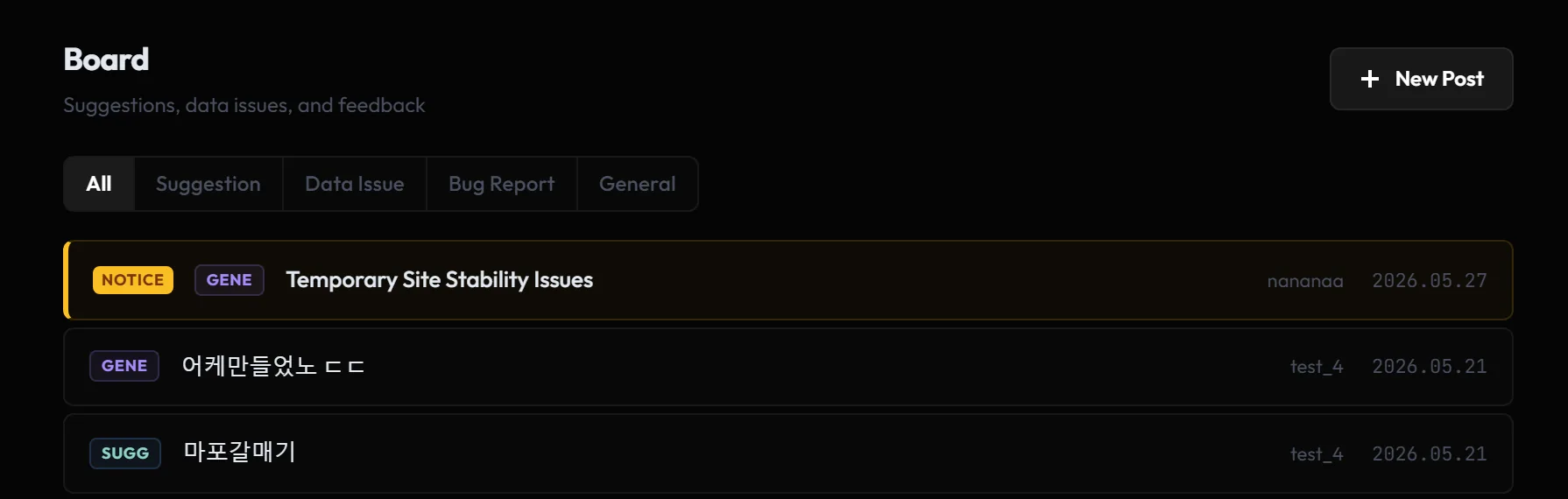
The board at /board is where users report data issues, file bugs, and suggest
features. The header reads Board with the subtitle
Suggestions, data issues, and feedback, and a
New Post button on the right. The board is not anonymous: every post and
comment displays the author's account nickname, and your own posts are highlighted.
Reading the list
Category tabs filter the list: All, Suggestion, Data Issue, Bug Report, General. The list shows 15 posts per page with Prev and Next controls, sorted notices first, then pinned posts, then newest.
| Marker | Meaning |
|---|---|
| NOTICE | An announcement from the Web3Map team, pinned to the top for all users and given a highlighted border. |
| Yellow star | A pinned post that is not a notice. Pinned posts sort directly under notices. |
| Category badge | A short code for the category: DATA for Data Issue, plus abbreviated codes for Suggestion, Bug Report, and General. |
| REPLIED | The team has posted an official reply on this post. |
| Lock icon | A secret post. The row is visible to everyone, but the title displays as [Secret] to anyone other than the author and administrators, and opening it is denied. |
[N] |
Comment count. |
| Nickname | The author's display name. Your own posts show your nickname in blue. |
| Date | Creation date in YYYY.MM.DD format. |
Writing a post
Posting requires a signed-in account. Guests see a warning titled Login required with the message Create an account or sign in to write posts. and the form stays disabled.
- Category
-
Pick one of Suggestion, Data Issue, Bug Report, or General. Suggestion is the default. Use Data Issue for wrong prices, wrong token mappings, or missing venues so the team can triage it as a data problem.
- Title
-
Placeholder Brief summary of your feedback. Up to 200 characters.
- Details
-
Placeholder Describe the issue or suggestion in detail.... Up to 10,000 characters. Line breaks are preserved when the post is displayed.
- Pin Code
-
A 4-digit number, described on the form as 4-digit number for post deletion (placeholder 0000). This is the only credential that lets you edit or delete the post later, so pick something you will remember. It is masked as you type.
- Secret post toggle
-
Helper text: (only you and admins can see). A secret post's row still appears in the list, but with the title replaced by [Secret] for everyone except you and the team. Use it for reports that include account-specific details.
- Submit
-
Becomes active once the title, body, and a 4-digit pin are filled, and shows Posting... while sending. Validation errors are exact: Title and body are required. and Pin code must be exactly 4 digits.
Heads up: The pin code is not your account password and does not protect your account. It only authorizes editing or deleting that one post or comment. Do not reuse a number you care about, and note that without the pin you cannot edit or delete the post yourself.
Editing, deleting, and comments
On your own post, Edit and Delete first ask for your pin: Enter your 4-digit pin code to edit this post. or Enter your 4-digit pin code to delete this post. followed by Confirm Delete for deletion or an edit form with Save Changes. Comments work the same way: the comment form has a Write a comment... field (up to 2,000 characters), a Pin input with the hint 4-digit pin for edit/delete, and a Comment button. Edited comments are marked edited.
When the team answers a post, the reply appears as a green card titled Admin Reply directly under the post body, with its own timestamp. Each post carries at most one official reply, and having one is what produces the REPLIED badge in the list.
Telegram setup and supported commands
Pro accounts can receive premium price spike and new entry alerts in a private Telegram chat. The design is bring-your-own-bot: you create a bot you own with BotFather, register its token with Web3Map, and alerts are delivered through your bot, in your chat. Setup lives in My Page under Premium Alerts.
Heads up: Telegram alerts require an active Pro plan. The Premium Alerts section appears in My Page once your plan is active, and delivery stops if the plan lapses.
- Create your bot.
In Telegram, open
@BotFatherand send/newbot. Follow the prompts to name the bot. This bot belongs to you, not to Web3Map. - Copy the token.
BotFather replies with an HTTP API token in the form 123456:ABC-DEF.... Treat it like a password.
- Paste it in My Page.
Open Premium Alerts, find Step 1 (Connect your bot), and paste the token into the BotFather token field. The field hint reads Stored encrypted. Rotate anytime.; the token is encrypted at rest.
- Press Register bot.
Web3Map validates the bot with Telegram and generates a private deep link. The Deep link ready box shows the link and its expiry time.
- Open the deep link within 10 minutes.
The link opens a private chat with your bot; send
/startthere to complete the connection. Deep links expire after 10 minutes; if yours lapses, press New deep link in Step 2 (Delivery status) and try again. When everything is connected, Delivery shows an Active badge. - Tune Alert rules and save.
In Step 3, toggle the four signal types (Price spikes, Sell Rise, Buy Drop, New entries), set per-window thresholds under Spike windows, set the New entries minimum spread, and optionally build Mute lists by token, CEX, or chain. Nothing applies until you press Save changes, and saving has a 30 second cooldown.
When the bot is registered, Web3Map installs a command menu in your private chat automatically. Commands let you check link status, pause and resume delivery, and manage the new-entry and price-spike mute lists without leaving Telegram. The complete command reference, the alert message formats, and the in-chat settings menu are documented in the Telegram alerts guide; the account-side controls (token rotation, unlinking, mute list limits) are covered in Account & billing.
Tip: The web dashboard and Telegram share one mute state. Hiding an asset with the eye icon in the Arbitrage view also mutes it for your Telegram arbitrage alerts, and spike-card hides feed the separate price-spike mute list. The two lists are independent: price-spike mutes do not inherit new-entry mutes.
Safety and troubleshooting
A spread on screen is a measurement, not a promise. Between seeing a number and completing a real position there are transfers, fees, contract risks, and time. Run this checklist first.
Before you act
- Confirm deposit and withdraw status on both CEX legs.
Open the asset's Token Flow and click a deposit or withdraw edge: the Status card shows Enabled or Disabled per direction with a freshness grade, and the price panel marks venues with a missing transfer path as Transfer blocked. A perfect spread is worthless if you cannot move the token.
- Check real depth at your size.
All quotes are a $1,000 fill basis. A larger order fills at worse prices, so check the CEX orderbook and the DEX pool's liquidity before assuming the displayed spread scales.
- Account for price impact and fees on the DEX leg.
Thin pools move when you trade against them. Pool size and the fee tier of the specific pool both eat into the gap.
- Price the bridge on cross-chain routes.
A Need bridge badge means no known route exists; treat the row as informational. Where a route exists, Pro shows live bridge fee, estimated transfer time, and remaining credit. Slow bridges add minutes during which the spread can vanish.
- Verify token contract identity.
The Diff contract badge means the buy and sell legs use different token contracts on the same chain. They are not directly transferable; confirm the two contracts are actually convertible before treating them as one market. Same symbol does not mean same token.
- Budget gas for every on-chain step.
Swaps, approvals, bridge sends, and withdrawals each cost gas on their respective chains.
- Check freshness last, right before you commit.
Faded rows are stale and already excluded from spread math. If a degraded banner is showing, treat the whole snapshot as unreliable until it clears.
Troubleshooting
- Prices look frozen
-
The live WebSocket connection may have dropped. The app falls back to polling automatically (every 30 seconds on Pro, every 60 seconds on public sessions), so data still updates, just less often. To force a reload, press Refresh View in the toolbar; it shows Refreshing... while working and a green Refreshed when done.
- A price row looks faded
-
That row is stale: it is rendered at half opacity and excluded from spread calculations. Wait for the next refresh cycle; if it stays stale, the venue's feed is having problems and the hard gate is doing its job.
- Market data unavailable - arbitrage temporarily paused
-
This red banner appears in the price panel when the market data request for the selected asset fails entirely. Client-side spread calculation pauses until data returns. Related banners on the Arbitrage view: Price/status freshness degraded. Results may be stale. (upstream freshness is degraded; cross-check before acting) and Failed to load backend arbitrage feed. (the feed request failed; retry or press Refresh View).
- Telegram bot will not connect
-
Deep links expire after 10 minutes, and requesting a new one revokes the old one. Press New deep link in Premium Alerts and send
/startagain promptly. If registration reports that the token is already connected to another Web3Map account, unlink it there first or create a fresh bot with BotFather and register the new token. - Sign-in errors
-
Incorrect email or password. means exactly that. A message starting Too many recent sign-in attempts. means you are rate limited; wait the indicated seconds and retry. This account has been disabled. means the account cannot sign in; reach out via the board if you believe this is an error.
- Lost password
-
There is no self-serve password reset today, so keep your credentials safe. As a safeguard, link a wallet to your account in My Page under Connected Methods; a linked wallet is a second, independent way to sign in to the same account.
Hard gate: When in doubt, do nothing. Web3Map intentionally fails closed on unknown or stale data, and you should apply the same rule to your own actions.
Glossary
Compact definitions for every recurring term in the product and these docs.
- Arbitrage opportunity
- A positive price spread between two venues for the same asset within one data snapshot. The dashboard groups rows per asset and sorts them by spread.
- Asset
- One logical token tracked across the map. An asset can have multiple member contracts (one per chain) and listings on many venues; hiding and alerting operate per asset.
- Audience
- Your data tier. Public (guests and Free): 60 second refresh, a snapshot released about 3 seconds behind the internal system, premium fields omitted. Premium (Pro): 30 second refresh with full fields.
- Basis ($1,000 fill)
- The pricing convention: every displayed price is the effective execution price of a $1,000 fill on that venue, annotated as $1000 basis in the price panel.
- bps (basis points)
- One hundredth of a percent; 1 bps = 0.01%. Spreads are computed in bps and displayed as percentages.
- Bridge
- A cross-chain transfer route between two chains. Opportunities flag whether a route exists (Bridge) or not (Need bridge); Pro adds live fee, estimated time, and credit.
- Buy Drop
- A spike type: previous sell price minus current buy price, divided by the previous sell price. Shown as a negative percentage with a red badge; it means the asset suddenly became much cheaper to buy.
- CEX surface
- A distinct market within one exchange, such as USDT spot, KRW spot, or a perp market. Deposit and withdraw status attach to the surface, and venue labels include it (UPBIT KRW, BINANCE PERP).
- Deep link
- Either a
/graph?asset=URL that opens an asset's Token Flow directly, or the time-limited (10 minute) Telegram link used to connect your alert bot. - Episode
- The tracked life of one price spike, from detection to resolution. Cards show the value at detection next to the live value; resolved spikes remain visible but faded for a short retention window.
- Fallback price
- A price recorded under degraded conditions, for example a partial fill. It carries a FALLBACK badge, ranks below primary prices, and on Pro includes a reason row.
- Freshness
- How recently a price or status was confirmed. Stale price rows fade to half opacity and are excluded from spread math; transfer status is graded fresh (under 3 minutes), warning (3 to 5 minutes), or stale (over 5 minutes, treated as fail).
- Hard gate
- The safety rule that unknown or stale data is treated as not viable. The system fails closed instead of guessing.
- Kimchi premium
- A CEX-CEX opportunity where exactly one leg is on a Korean exchange (Upbit or Bithumb).
- KR premium
- A CEX-CEX opportunity where both legs are on Korean exchanges.
- New entry
- An opportunity flagged as newly entered whose first appearance is within the server's new-entry window (default 1 hour). Shown in the New Entries panel with detection time and the spread at detection versus now.
- Perp funding
- The periodic payment between long and short positions on a perpetual futures market. Perp rows show the funding rate, the funding interval, a countdown to the next funding, and open interest (OI).
- Pool
- A DEX liquidity pool that quotes one side of an opportunity. Pool ids are visible and copyable on Pro.
- Sell Rise
- A spike type: current sell price minus previous buy price, divided by the previous buy price. Shown as a positive percentage with a green badge; it means the asset suddenly became much more valuable to sell.
- Spread
- The relative gap between the buy leg and the sell leg, computed in basis points and displayed as a percentage such as +5.20%.
- Venue
- Any single price source: a CEX surface, a CEX perp market, or a DEX version on a specific chain.